License and Macs
Fourteen days of everything, then one payment. No account, three Macs, every update of the current major version.
Written from Teserra 1.3.16 · Markdown ·
In short
- Use everything for fourteen days, with no account and no card.
- Get Teserra: checkout opens in your browser, the key arrives by email.
- Paste it in Settings›License. One license, three Macs.
The trial
Everything works for fourteen days, no account, no card. A small chip in the toolbar counts the days: “Trial · 9 days left”. When it ends, the app asks for a license and your library stays exactly where it is, readable with or without Teserra.
Buying
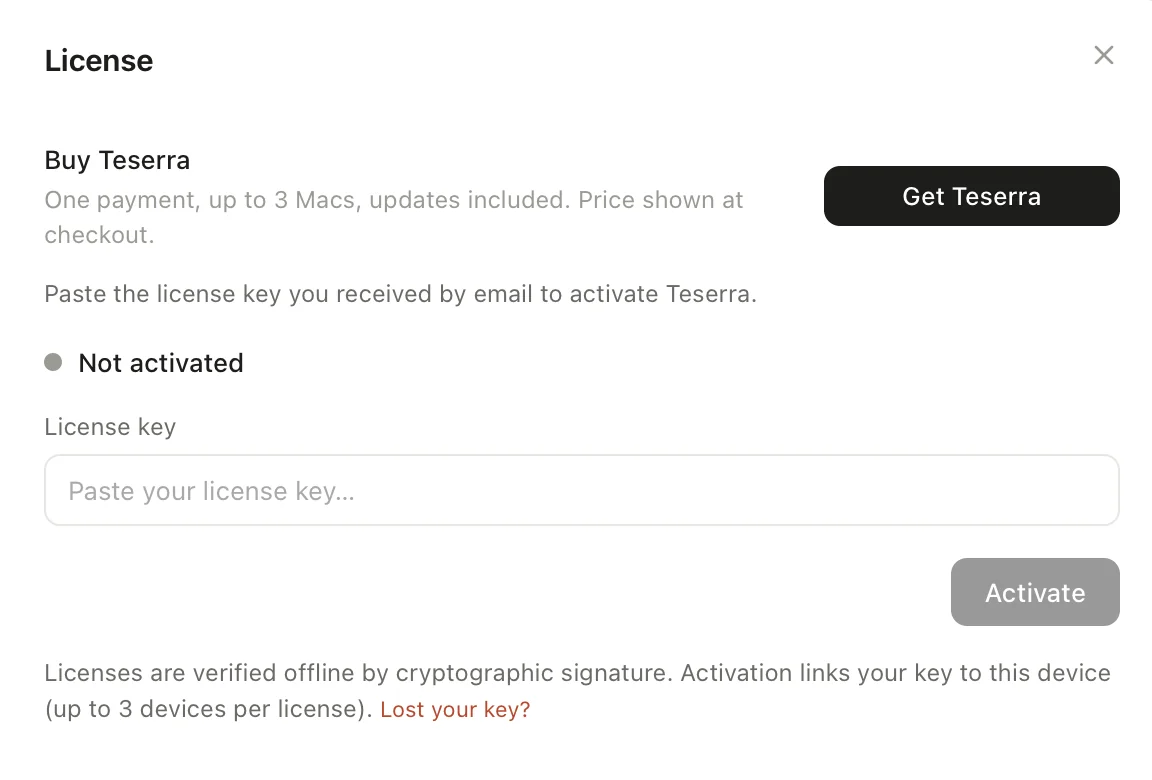
Click Get Teserra in the app, or the trial chip, or go straight to teserra.app/buy. Checkout opens in your browser, handled by Stripe. Your license key arrives by email within a minute. Paste it in the app: done. The price is $29, taxes included where they apply.
Three Macs
A license activates on up to three Macs. When all three are taken, activate the fourth from Settings → License: it shows the list of machines with their last activity, and Sign out frees one on the spot. No support ticket needed.
Updates
Teserra checks for updates when it starts. When one is ready, Update available appears in the sidebar and a badge on the Dock icon; a click shows the release notes for everything you missed. Every update of the current major version is included. A future major version may be a paid upgrade, announced in advance.
Lost your key
In the app, Lost your key? then Send my key emails it again to the address you bought with. Or write to [email protected] from that address, and we resend it.
Refunds
Not for you after all? Write within fourteen days of purchase and we refund you. Terms